
3GPP Search & Intelligence Platform

Find 3GPP Evidence and See Exactly Where It Came From

Search the 3GPP record with precision, read each match in context and check it against the original document. AI helps explain the technical detail, and every answer links back to its source.

Designed for SEP, patent and standards professionals.

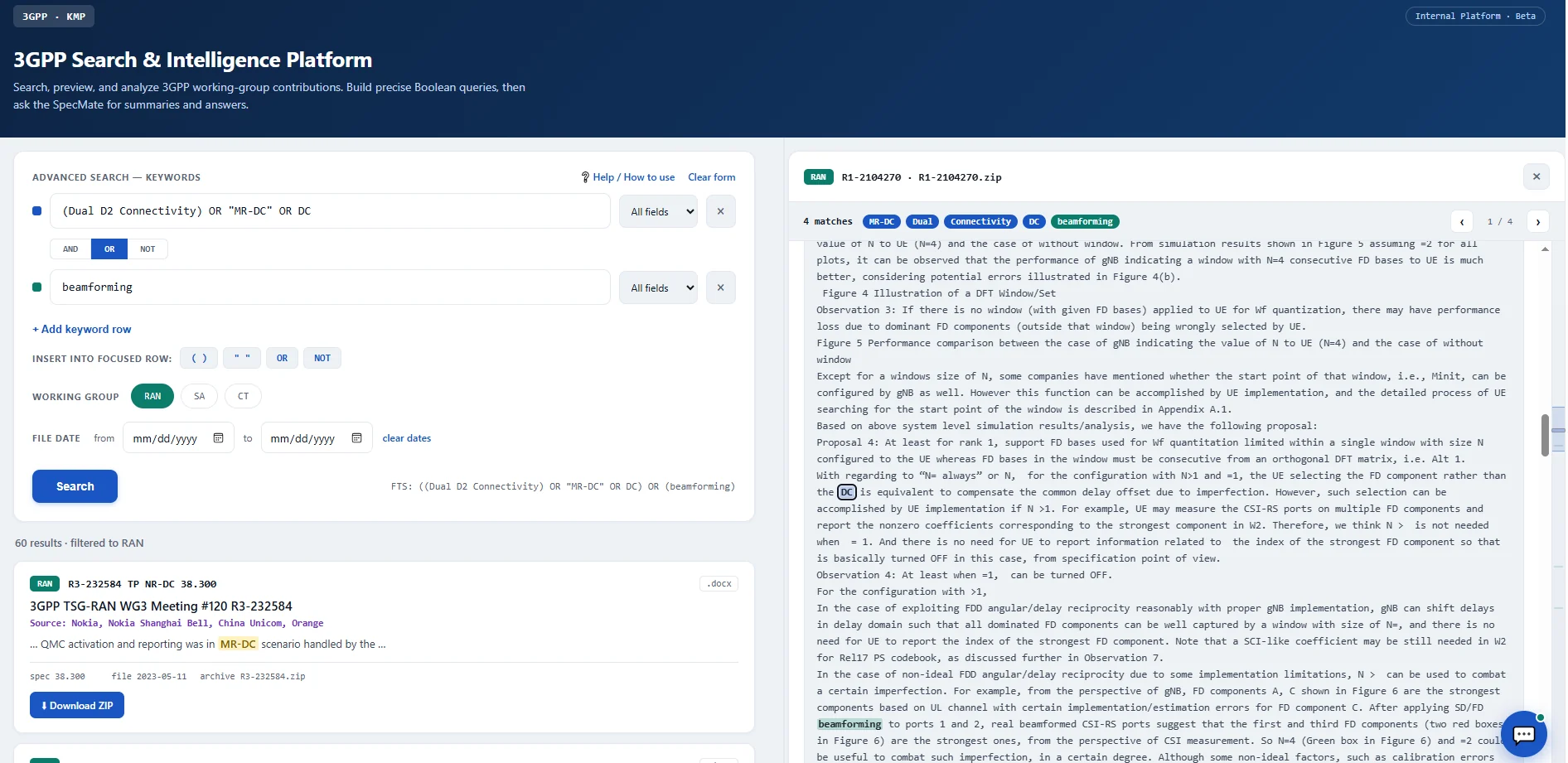
3GPP platform workspace showing a multi-row search and a document preview with highlighted matches
3GPP search and evidence review in one workspace.
The Research Challenge

Spend Less Time Finding the Right
3GPP Disclosure and More Time
Evaluating Evidence.

SEP research needs more than locating 3GPP documents. A claim feature rarely sits in one obvious phrase. It may be described in different words, spread across several contributions and refined through change requests before it reaches a specification. The platform helps you follow that trail and keep the source in sight.

Different words, same disclosure.

Claim language and standards terminology rarely match, so one phrase can miss the passage that matters.

How the platform helps

Combine Boolean logic, exact phrases, proximity operators and word variants across multiple concept rows to match how the standard is actually written.
Evidence scattered across the 3GPP record.

Contributions, change requests, specifications and meeting records all tell part of the story, and they are hard to connect by hand.

How the platform helps

Filter by working group, contributor, meeting, release and date to see where a concept was proposed, discussed, modified or adopted.

Manual downloads slow every review.

Opening and searching files one by one costs time and risks a missed reference.

How the platform helps

Preview documents and inspect highlighted occurrences inside the workspace, so you can verify passages without downloading large sets of files.

Dense text makes the technical story hard to follow.

A finding is only useful if you can see its context and prove where it came from.

How the platform helps

Document grounded AI summarizes, compares and explains disclosures, and every insight stays tied to the original document.

Key capabilities

3GPP Search Tools That Keep You Close to the Source

Search, filter, read and check 3GPP documents in one place.

Precise search

Search by exact phrase, word variations and combinations of terms to find what you are really looking for.

  • Boolean
  • Exact phrase
  • Proximity
  • Word variants
  • Concept rows

Multiple concept search

When a claim feature is expressed in different words, or when evidence depends on several features appearing in the same technical context, structured search helps you find it.

Standards context filtering

Narrow results by technical specification group (TSG), contributor, meeting, release and date, so you focus on the most relevant parts of the 3GPP record.

Timing and source lineage

Understand where a concept was proposed, discussed, modified or adopted. In SEP work, timing, source and standards lineage often matter as much as the technical phrase itself.

Integrated evidence review

Preview documents, inspect highlighted occurrences and verify the passages behind each conclusion, without downloading and manually searching large sets of files.

Document grounded AI analysis

Summarize disclosures, compare documents and reconstruct how technical concepts evolved across the standards record. Analysis stays grounded in the retrieved document set.

From search results to clear understanding

3GPP AI Analysis That Always Points Back to the Source

Read a passage in its document, then use AI to help explain the technical detail. The original source stays in view, so you can always check the answer yourself.

  • Ask: Ask a technical question about the document you are reviewing.
  • Summarize: Get a short summary of what a document discloses and which passages deserve a closer look.
  • Compare: Look across documents to see how a technical idea developed over time.

AI supports your research. You review the evidence and decide what it means for your claims, standards and licensing questions.

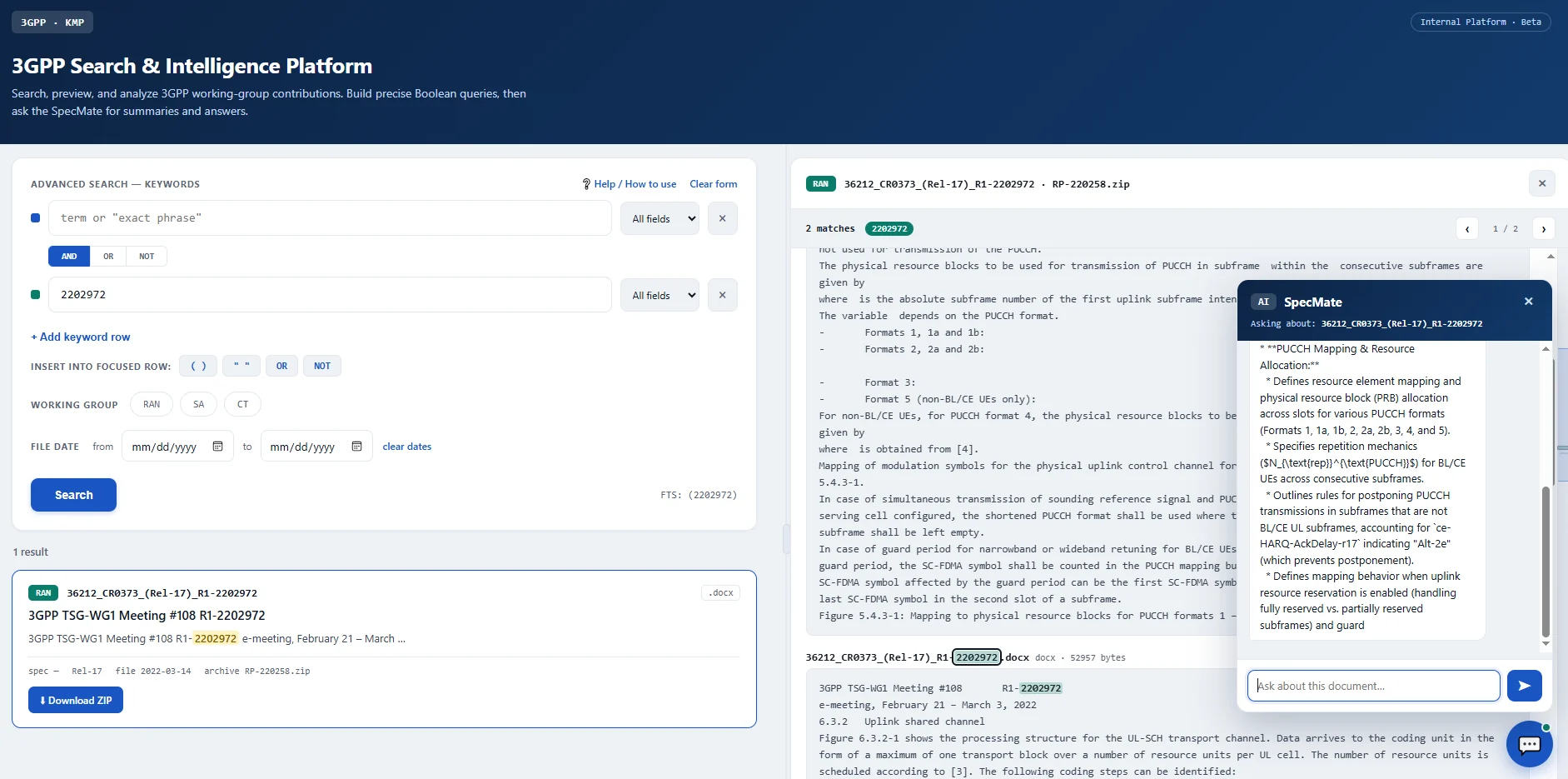
AI assistant panel open next to a 3GPP document preview and the platform's search controls
The AI assistant sits next to the document preview, so every question stays close to the source.
How it works

A Simple Path from Your Question to 3GPP Evidence You Can Check

Six clear steps, from your technical question to a source you can verify.

  1. Define the feature

    Start with the claim feature, concept or question you want to investigate.

  2. Build the query

    Combine concepts, similar terms, exact phrases and operators.

  3. Search and narrow

    Filter by working group, contributor, meeting, release and date.

  4. Review the passage

    Read the highlighted matches and the text around them.

  5. Ask the AI

    Summarize, compare and explain what the documents say.

  6. Trace to the source

    Check every finding against the original 3GPP document.

AI assists the research process. Researchers review the evidence and determine its significance for claims, standards and licensing questions.

Research Applications

Where the 3GPP Platform Helps Most in SEP Work

Use the platform to find, read and check 3GPP evidence for your patent and technical research.

Standards to patent mapping

Which 3GPP passages relate to a claim feature? Find them and review them in context.

Prior art and validity research

Where does an idea appear in the record, and when? Find the disclosure and check its timing.

Claim chart preparation

Which passages belong in the chart? Find the evidence and check it in context first.

SEP and licensing research

How does a disclosure relate to the patent or standard you are reviewing? Build a clearer basis for your analysis.

Technical history

How are the documents connected? Follow an idea across contributions, change requests, specifications and releases.

Technology analysis

What does the material describe? Compare disclosures to understand a concept and how it is put into practice.

Product roadmap, planned enhancements

Where the 3GPP Platform Is Heading Next

These are planned additions. They are separate from what you can use today.

Custom highlighting

Mark the terms that matter to you, so key passages stand out faster.

Natural language search

Describe a concept in everyday words and find related passages.

Specs and reports filter

Filter results by technical specifications and technical reports.

More precise release and technology filters

Narrow results by release and technology generation.

Before your demo

3GPP Platform FAQs: Simple Answers Before Your Demo

Ask for a demo to review the current document coverage and how it fits your research needs.

You can filter by working group, contributor, meeting, release and date, and combine Boolean, proximity and phrase based logic across multiple concept rows.

Proximity search finds places where your chosen terms appear close to each other, not just anywhere in the same document. It helps when a claim feature is described across a sentence or a paragraph.

It helps you summarize, compare and explain what documents say, and follow how an idea developed over time. Its answers are based on the documents you are reviewing and link back to the source.

Not yet. You can filter by release today. Natural language search and more precise release and technology filters are planned.

No. The platform helps you find and review standards evidence. Decisions about essentiality, validity and strategy stay with you and your experts.

SEP, patent, standards, licensing and technical teams, including legal and business stakeholders who need to review and share findings.

See the platform in action

Ready to transform SEP research?

Explore the platform, request a demo or speak with our team to see how standards intelligence can support your SEP workflow.

Request a platform demo Speak with Ingenious e-Brain about your research needs.
Contact Us